


MOUNTAIN VIEW, CA — Google announced the official release of a native Gemini app for macOS today, April 15, 2026. The application is now available for download on the Mac App Store and via Google’s website, marking a significant shift from web-based access to a dedicated desktop experience.
Key Features and Functionality
The app is built using 100% native Swift, ensuring high performance and deep integration with Apple’s operating system.
- Keyboard Shortcuts:Keyboard Shortcuts: You can summon a compact Gemini overlay using Option + Space.Option + Space For a full-screen chat experience, use Option + Shift + Space.Option + Shift + Space
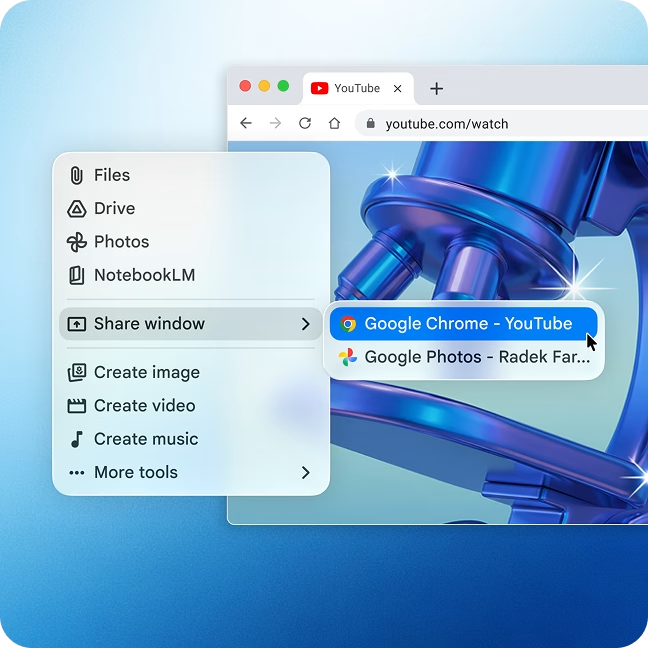
- Contextual Awareness:Contextual Awareness: A new “Share Window” feature allows Gemini to analyze active windows on your screen. You can ask questions about specific documents, code snippets, or charts without manually copying and pasting text.
- Creative Suite: The app integrates Nano Banana 2 for high-fidelity image generation and Veo for video creation directly on the desktop.Nano Banana 2Veo
- File Analysis:File Analysis: You can drag and drop local files, including PDFs and spreadsheets, for instant summarization and data extraction.
System Requirements and Pricing
The application requires macOS Sequoia (15.0) or later and is optimized for Apple Silicon (M-series chips). macOS Sequoia (15.0) or later
| Tier | Monthly Cost | Primary Features |
|---|---|---|
| Free | $0 | Standard access to Gemini 3 Flash and image generation. |
| AI Plus | $7.99 | Increased usage limits and Nano Banana Pro access. |
| AI Pro | $19.99 | Extended context window and advanced coding tools. |
| AI Ultra | $249.99 | Highest priority access and enterprise-grade security. |
Competitive Landscape
This release positions Google to compete directly with OpenAI and Anthropic, which have maintained native Mac applications for over a year. Google also confirmed that this app serves as the foundation for a multi-year collaboration with Apple, which will see Gemini-powered features integrated into Siri later this year in macOS 16.
You must enable Screen Recording and Accessibility permissions in System Settings to utilize the full range of screen-aware features.
The company positioned the Mac release as part of a wider push to make Gemini a more embedded productivity tool for writing, research, coding and creative work from the desktop rather than only through the web.